
A little bit of training, some researching, and a lot of time on the GUI is what I found to be the recipe in getting comfortable with Aruba Wireless Controllers. Even though I spent more time configuring the controllers via GUI, knowing the syntaxes I now find it much simpler to do it via the CLI. I do find the controller GUI much more useful in troubleshooting and verifying the wireless client connectivity. In this blog, I will share some knowledge and insights that I have gained while deploying Aruba’s Wireless Controllers for one of our customers.
Controllers Overview
Aruba offers wireless controllers in the 7000 series and 7200 series models. The 7000 series controllers scale for small to large branch offices from 16 to 64 maximum AP capacity with an option of up to 24 switchports for unified wired and wireless access. The 7200 series controllers are suitable for campus networks and support from 256 APs to 2,048 maximum AP capacity.
The controllers can be deployed as Master or Local. Aruba suggest deploying the 7000 series controllers as Local, while the 7200 series are typically deployed as Master controllers. In a Master-Local deployment, Master holds responsibility of all policy configurations. This would include services such as WIPS, Initial AP configurations, user roles and authentication related configurations, etc. The Local controller terminates AP tunnels, processes and forwards user traffic (including authentication), manages ARM (Adaptive Radio Management), Mobility features and QoS.
Aruba also offers a Mobility Master Appliance which provides additional features which are not available in the other controller models. It provides controller clustering capability that allow better user experience via features like Hitless Failover, Automatic User Load Balancing, Automatic AP Load Balancing, and Seamless Roaming across the cluster. This type of deployment could perhaps be considered for sensitive environments where high wireless performance and reliability is a requirement for critical services.
Note: ArubaOS 8.X is required with Mobility Master Appliance. APs cannot terminate on any Master or Mobility Master controllers with this code, they can only terminate on controllers deployed in Local mode. ArubaOS 6.X allows AP termination on either Master or Local controllers.
Licensing
Master controller(s) can be configured with the Centralized Licensing feature. This allows the creation of a shared pool of AP Licenses that can be used by all controllers in the network. When an AP joins a Local controller, it consumes an AP License along with a PEF-NG (Aruba’s Policy Enforcement Firewall) and an RFProtect License from the pool.
While Centralized Licensing allows flexibility, it is important to note that the Maximum AP Capacity of some of the smaller controllers can be a “Gotcha”, if not designed carefully. Suppose you have deployed a 7205 model controller as the Master and a 7030 controller as the Local in a Master-Local HA Active-Active deployment, with a total of 100 AP licenses and centralized licensing feature is enabled. [DD1] [NP2] If the APs are load balanced (50-50 on each controller) and master controller fails, only 14 APs would failover and 36 of them would be down. This is due to the AP capacity of 7030 model controllers only allowing 64 APs to join it.
Redundancy
To enable redundancy, any combination of HA Deployment Models can be used…
- Master / Standby Master with HA Active-Active Local Controllers — Full redundancy
- Master with HA Active-Standby Locals — N+1 Redundancy with Over-subscription
- Master-Local HA Active-Active or Standby-Active — Master Active or acting as backup LMS
- Independent Masters HA Active-Active — No local controllers, each master acting as backup for the other
As long as the pool of AP licenses are not exceeded, APs have failover capability to the backup LMS IP, which can be another Local or Master based on deployment. During failover to the backup LMS, APs would normally reboot causing minutes of outage, unless Aruba’s AP Fast Failover feature is enabled. This feature allows APs to form standby tunnels to the backup LMS for instant failover and minimize downtime.
Configurations
Aruba wireless controller configurations take a hierarchal approach, where multiple configuration profiles are built separately and are attached to higher-level profiles. Best practice is to configure the lowest-level settings and profiles first, then build up. Reviewing these controller configurations may be confusing for a lot of us without fully understanding the configurational hierarchy.
Following is an output of the CLI command “show profile-hierarchy” on a 7205 controller, it shows how profiles relate to each other and provide some clarity.
ap-group
   wlan virtual-ap
       aaa profile
           aaa authentication mac
           aaa server-group
               aaa authentication-server radius
                   aaa radius modifier
           aaa authentication dot1x
           aaa xml-api server
           aaa rfc-3576-server
       wlan dot11k-profile
           wlan handover-trigger-profile
           wlan rrm-ie-profile
           wlan bcn-rpt-req-profile
           wlan tsm-req-profile
       wlan hotspot hs2-profile
           wlan hotspot advertisement-profile
               wlan hotspot anqp-venue-name-profile
               wlan hotspot anqp-nwk-auth-profile
               wlan hotspot anqp-roam-cons-profile
               wlan hotspot anqp-nai-realm-profile
               wlan hotspot anqp-3gpp-nwk-profile
               wlan hotspot anqp-ip-addr-avail-profile
               wlan hotspot h2qp-wan-metrics-profile
               wlan hotspot h2qp-operator-friendly-name-profile
               wlan hotspot h2qp-conn-capability-profile
               wlan hotspot h2qp-op-cl-profile
               wlan hotspot h2qp-osu-prov-list-profile
               wlan hotspot anqp-domain-name-profile
       wlan ssid-profile
           wlan edca-parameters-profile station
           wlan edca-parameters-profile ap
           wlan ht-ssid-profile
           wlan dot11r-profile
       wlan wmm-traffic-management-profile
       wlan anyspot-profile
   rf dot11a-radio-profile
       rf spectrum-profile
       rf arm-profile
       rf ht-radio-profile
       rf am-scan-profile
   rf dot11g-radio-profile
       rf spectrum-profile
       rf arm-profile
       rf ht-radio-profile
       rf am-scan-profile
   ap wired-port-profile
       ap wired-ap-profile
       ap enet-link-profile
       ap lldp profile
           ap lldp med-network-policy-profile
       aaa profile
           aaa authentication mac
           aaa server-group
               aaa authentication-server radius
                   aaa radius modifier
           aaa authentication dot1x
           aaa xml-api server
           aaa rfc-3576-server
   ap system-profile
   wlan voip-cac-profile
   wlan traffic-management-profile
       wlan virtual-ap
           aaa profile
               aaa authentication mac
               aaa server-group
                   aaa authentication-server radius
                       aaa radius modifier
               aaa authentication dot1x
               aaa xml-api server
               aaa rfc-3576-server
           wlan dot11k-profile
               wlan handover-trigger-profile
               wlan rrm-ie-profile
               wlan bcn-rpt-req-profile
               wlan tsm-req-profile
           wlan hotspot hs2-profile
               wlan hotspot advertisement-profile
                   wlan hotspot anqp-venue-name-profile
                   wlan hotspot anqp-nwk-auth-profile
                   wlan hotspot anqp-roam-cons-profile
                   wlan hotspot anqp-nai-realm-profile
                   wlan hotspot anqp-3gpp-nwk-profile
                   wlan hotspot anqp-ip-addr-avail-profile
                   wlan hotspot h2qp-wan-metrics-profile
                   wlan hotspot h2qp-operator-friendly-name-profile
                   wlan hotspot h2qp-conn-capability-profile
                   wlan hotspot h2qp-op-cl-profile
                   wlan hotspot h2qp-osu-prov-list-profile
                   wlan hotspot anqp-domain-name-profile
           wlan ssid-profile
               wlan edca-parameters-profile station
               wlan edca-parameters-profile ap
               wlan ht-ssid-profile
               wlan dot11r-profile
           wlan wmm-traffic-management-profile
           wlan anyspot-profile
   ap regulatory-domain-profile
   rf optimization-profile
   rf event-thresholds-profile
   ids profile
       ids general-profile
       ids signature-matching-profile
           ids signature-profile
       ids dos-profile
           ids rate-thresholds-profile
       ids impersonation-profile
       ids unauthorized-device-profile
   ap mesh-radio-profile
       ap mesh-ht-ssid-profile
   ap mesh-cluster-profile
   rf arm-rf-domain-profile
   ap provisioning-profile
   ap authorization-profile
Fortunately, you only need to configure a few of these for a successful deployment. Many of the profiles and parameters do not require tweaking in most environments. Here is a review of some of the important configurations and profiles that were recently deployed at a customer site.
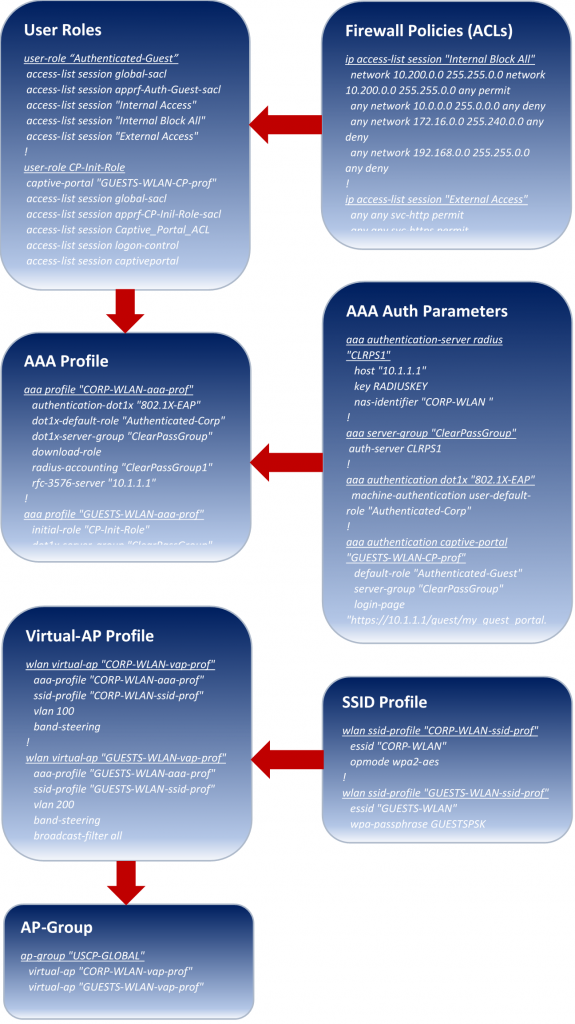
The chart above walks through the configuration flow from low-level (top) to high-level (bottom) profiles.
Note: the example configurations shown are only partial configurations to provide a visual and are valid for ArubaOS 6.x code command line.
Starting from the bottom of the chart…
AP-Group combines it all. Each AP must be assigned to an AP-Group at the time of deployment. An AP-Group essentially defines SSIDs the AP will know of and advertise, authentication used, VLAN assignation, etc. You can use a single AP-Group for the entire network or break it down per site or region. Unless you are advertising different SSIDs for different sets of APs (per site or region), it is simpler to use a single AP-Group.
A Virtual-AP Profile is created per SSID and is assigned to the AP-Group. Each Virtual-AP profile is assigned an SSID Profile which defines the SSID and a AAA Profile which defines all authentication parameters corresponding to that SSID. A VLAN is also configured under the Virtual-AP profile and is assigned to all users by default, unless a specific VLAN is assigned to the User Roleto which a user is assigned, which takes precedence. Attributes are then configured under the AAA profile. AAA authentication parameters are defined within the AAA server/group, dot1x, captive portal etc. User Roles are also configured under AAA profiles to define the pre- or post-authentication roles for users.
User Role defines the access a user is permitted based on the configured Firewall Policiesfor each role. Firewall Policies are essentially ACLs (standard, extended, service based, etc.). As users attempt to connect to any SSID, they are assigned with an initial role. These initial roles define what type of access the user will have prior to authenticating (i.e. only http / https access to the captive portal for guests to authenticate). Once authenticated successfully, a user will get assigned a post-authentication role that provides network access defined by the administrator (i.e only http / https access to the internet, blocking all communications to RFC 1918 address space). User Role can also be derived as a Radius attribute from the AAA server with successful authentication. A VLAN can be assigned to the User Role, to either put them in an initial VLAN with restrictive access or to assign them with a special access VLAN (i.e. Network Admin Access).
Overall, Aruba Wireless Controllers are fairly simple to configure and seem to provide great flexibility in deploying Wireless solutions for your needs. More of my experience this year was with the ArubaOS 6.x code which vastly defers from the new 8.x train, new features, new look, etc. Next up for our customer is transitioning from 6.x to 8.x code with a new pair of Mobility Master controllers, perhaps also the topic for my next blog.
References
Mobility Boot Camp (Training):
ArubaOS 6.4.4.x User Guide: